Features
Just some of the many things PixlStash can do
AI features
Semantic search, face recognition, tagging, captioning, scoring and a review queue that checks the models' work. All of it runs on your machine.
Semantic search
Describe what you are looking for and get pictures back, tagged or not. CLIP embeddings, computed locally.
Face recognition
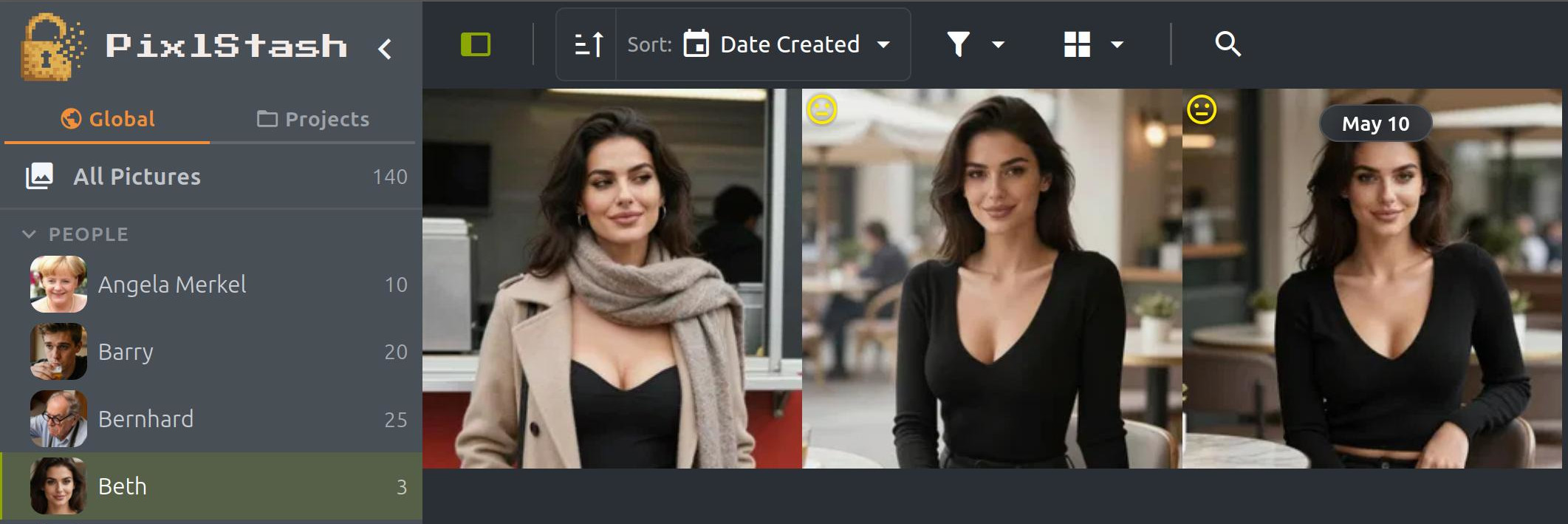
Faces are detected, embedded and grouped into characters you name. Search the library by uploading one face.
Tagging and captions
PixlStash Tagger, WD14, Florence-2 or JoyCaption, chosen per request rather than per install. Re-tag any selection from the context menu.
Label review queue
A ranked queue of the tags the models most likely got wrong, plus a health board per tag. Auto-tags become tags you can trust.
Quality and anomaly scoring
Smart score sorts a large set by what is worth looking at, with a calibrated penalty for malformed anatomy and render defects.
Round trip to ComfyUI
Generate from a selection and the results come back tagged, with their people, sets and projects already attached.
Workflows and recipes
The ComfyUI workflows behind your pictures, as a library you can run, and the recipe behind every picture you made.
A Workflows screen
Every workflow your pictures were made with, plus the files you add, as a card covered with the pictures it made. The one-offs are folded away until you ask for them.
A recipe on every picture
The workflow, prompt, models, LoRA strengths, settings and seed behind a picture made in ComfyUI, A1111 or Forge. Videos too. Save the look as a recipe and run it again.
One Run window
Run a workflow, make more like a picture, or run a workflow on a selection from the same window, with every value filled in and editable.
Create with LoRA
Right-click a person or set to make new pictures with their LoRA. Or pick two people in the Run window, describe them both, and get one picture with both in it.
ComfyUI, linked both ways
One click in Settings installs the PixlStash nodes into your ComfyUI and links the two apps. Open a workflow in ComfyUI and Ctrl+S saves it back to PixlStash as a new version.
Workflows that fix themselves
Swap a missing checkpoint, VAE or text encoder for one on your shelf. A missing LoRA or custom seed node no longer stops a run.
The folders you already have
Point PixlStash at a folder and it reads it where it sits, turning the folder names you already chose into projects, people and sets, without moving, renaming or copying a file.
Add a library from Settings
One folder picker, and the folder answers. A library you already made is added as it is, with its tags, scores and people. A folder of pictures is counted and offered. An empty folder starts a fresh library. A folder another library already covers is refused, and the refusal names that library.
Read what your folders mean
PixlStash proposes what each folder level is: project, set, person, tag or just a folder based on the context of each picture.
Nothing written until you agree
The review screen names every project, set and person your folders are about to become, and says plainly that no file is copied, moved or renamed. Organise later brings the pictures in and leaves the naming for another day; an interrupted import resumes.
A folder layout for what comes next
Give a library a layout (with folders for projects, people or sets) and PixlStash writes new pictures into this layout. This does not move pictures already in the library.
Move to match, never behind your back
A picture moves only when its folder stops being true, so adding a second project or person moves nothing. Where a picture is filed truthfully but not where the layout would put it today, the move is offered, counted first, and undone as one batch.
Export straight into a folder
Export the pictures you selected into a folder on the machine running PixlStash, which then opens in your file manager. Captions, resolution, sidecars and face crops come out as the zip export produces them, without the round trip through downloads.
Libraries, models and the command line
Keep separate picture libraries in one installation, catalogue the models already on your disks, and run the housekeeping from a terminal.
Several picture libraries
Register more than one library and keep one open at a time. Pictures, tags, scores and snapshots stay with their library, while your account, your preferences and the model shelf stay with the installation. Switch from Settings → Libraries.
Tokens and links per library
API tokens and share links belong to the library that created them. They go quiet while another library is open and work again when you switch back, and Settings warns you before you switch away from a library with live share links.
Model shelf
Register the folders holding your checkpoints and LoRAs and see what is in them: kind, base model, size, and every folder a copy sits in. Group and sort the shelf, move a model between folders, or delete one to your Trash.
Training runs and versions
Read an ai-toolkit run where it was written, then import it with its sample images. Versions of one subject group behind a single row, so a character you have trained four times is one entry with its history under it.
A command line
pixlstash-cli manages libraries, writes and restores backups, and installs plugins. Every command documents itself, including the exit codes a script needs, so a nightly backup is one cron line. The desktop app can run it without being open.
Folder permission repair
The desktop app checks at start-up whether another account on the computer can write to your library folder, and offers to tighten the permissions. It changes permissions only, and leaves your own access alone.
Work with confidence
Reverse everyday edits across your library, review duplicate candidates, and keep people and sets organised across projects.
Undo, redo, and history
Reverse soft-deletion, tagging, description edits, image assignments, moves, and duplicate decisions with standard keyboard shortcuts or toolbar controls. Open the history to inspect recent changes or step back several steps at once.
Duplicate review
Work through likely duplicate groups in a dedicated queue. Compare candidates, group pictures, exclude mismatches, stack the group, or keep it separate. Undo the decision if it was not right. Optional near-duplicate tiers and a similarity threshold put you in control of how broadly PixlStash searches.
Stack cleanup
Filter a view to stacked or unstacked pictures. Keep cover only previews a stack cleanup, keeps its cover, and sends the other copies to the recoverable Scrapheap without deleting originals from disk.
Multi-project organisation
Add one character or picture set to several projects at the same time. Its pictures appear in each project, while removing one membership leaves every other project alone.
Suggest more pictures
Start from a person and rank the library by face likeness. Adjust the match, review the result, and assign all found pictures or only your current selection in one action.
Privacy controls
Update checks and anonymous install telemetry have their own independent controls. Both are off until you enable them, and the Privacy pane states what is and is not sent.
A UI focused on the work
Model shelf
See the checkpoints and LoRAs in the folders you register, grouped by kind, base model, folder or feature.
Libraries
Switch between registered libraries from Settings. Each one keeps its own pictures, tags, scores and snapshots.
Full undo and redo
Inspect named changes, undo one or several steps, and redo them across metadata edits, assignments, moves, and stack decisions.
Duplicate review
Compare likely copies, choose a cover, stack the group, keep it separate, and undo the decision when it was not right.
Multi-project organisation
Keep one person or picture set in several projects without duplicating it or moving it back and forth.
Image grid
Pretty image view with scoring, stacking and sorting.
Justified or square layout
Thumbnails can keep their own aspect ratio and fill each row to the full grid width, or stay as squares. One size control in the toolbar, from Tiny to Huge, sets the thumbnail size in both layouts.
Project Organisation
Organise your projects efficiently with intuitive controls and additional metadata (here in dark theme)
Similarity sorting
Easily find pictures containing particular characters.
Reverse image & face search
Right-click any picture to run a reverse image search for visually similar pictures, or find other pictures containing the same face.
Tag review
A review queue finds the tags most likely to be wrong or missing and asks one question per picture. Answer with a click or a single key to clean up your tags.
Object detection
Detect the objects in a picture and draw labelled boxes over them. Export the boxes as COCO or Ideogram JSON for training and annotation pipelines.
Snapshots & restore
Automatic, compressed snapshots of your metadata, on a daily, weekly, and monthly schedule. Roll back to any restore point in a few clicks; a safety snapshot is taken first.
Selective restore
Don't want to roll back everything? Restore just the pictures you select. Anything not selected is left untouched.
Batch operations
Select images, tag or assign to sets or characters and perform batch actions.
ComfyUI Integration
Run the workflows behind your pictures directly from PixlStash, with progress in the Tasks tab, and open any of them in ComfyUI.
See the ComfyUI nodes & workflows →Picture inspection
Review and edit automatic descriptions and tags.
Face detection
Detect and assign faces to people in your photos.
Tag autocompletion
Tag with a keyboard shortcut and let PixlStash suggest tags as you type.
People management
Manage and organize people in your dataset efficiently.
Lots of keyboard shortcuts
Lots of convenient keyboard shortcuts for navigation, selection, scoring, tagging, and more.
Reference folders
Keep your existing folder structure while still benefiting from PixlStash's organisation and metadata features. Manage reference and import folders directly from the UI.
Statistics sidebar
Get a rapid overview of your picture sets, tag distribution, tag prediction confidence, and picture statistics at a glance.
Boolean set operations
Ctrl-click multiple characters or picture sets, then combine them with Union, Overlap, Difference, or Unique (XOR) operations.
Add your own image filter plugins
Extend PixlStash's functionality with custom Python plugins for image processing.
Picture sharing
Share pictures, sets, characters, and projects with a read-only link with no account required for viewers. Tokens are scoped and revocable. Optionally add your own watermarks for branding.
Context menus
Right-click anywhere in the grid or sidebar to rate, tag, assign, move, share, or delete without leaving your current view.
Custom icons for sets
Give each picture set its own coloured icon for instant recognition, no matter how similar the contents look.
Other features
The rest of the toolkit. The AI features have their own page.
Plugin system
Extend PixlStash's functionality with custom Python plugins for image processing.
Keyboard shortcuts
Navigate and control PixlStash efficiently using standard keyboard shortcuts for selection, scoring, deletion, etc.
Scrapheap auto-empty
Deleted pictures go to the scrapheap first and can be put back. PixlStash can empty it after 30, 60, 90, or 120 days, or leave it alone if the retention is set to Never. Auto-empty is off by default, and deleting for good asks you to type to confirm.
Background imports
Imports stream to the server and complete there, so closing the tab or navigating away does not cancel them. Progress shows in the task manager, and a running import can be aborted from there.
Security notifications
PixlStash checks for known security issues and alerts you in the UI when a fix is available, along with the severity and affected versions.
Faster background processing
Each picture moves to the next model as soon as its own rows land rather than waiting for the whole batch, models stay resident for a pass, decoding and resizing happen off the GPU worker, and the VRAM budget follows your card. Watch real-time progress in the statistics sidebar.